What Is a Cohort? Aging Up a Whole Club at Once
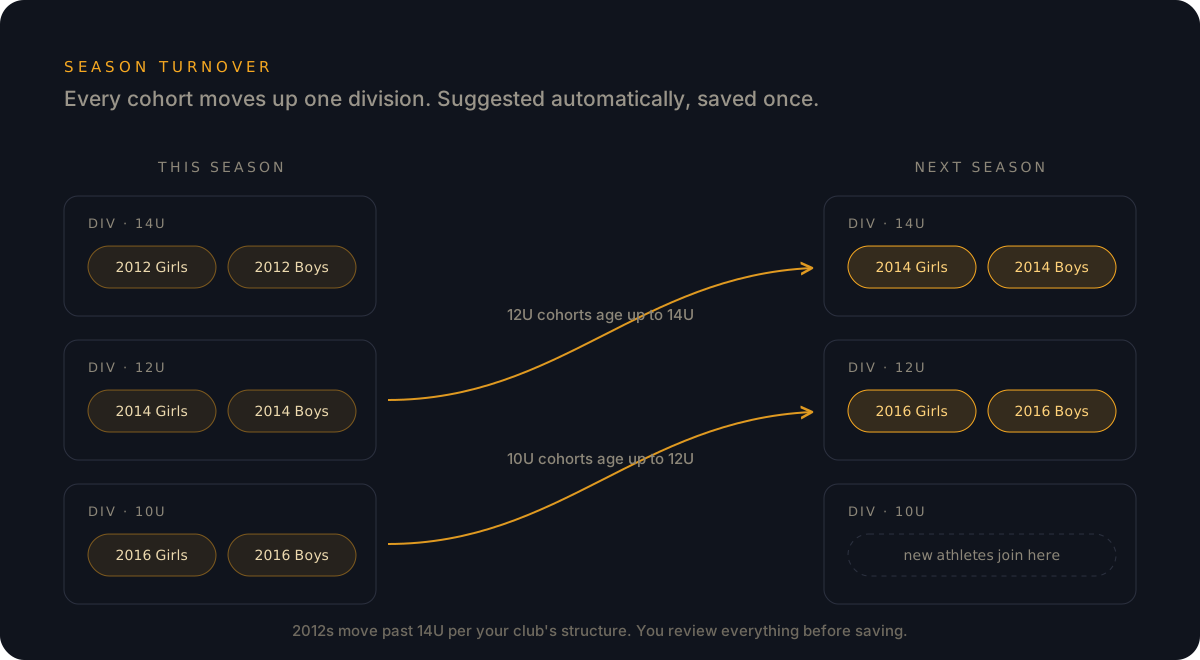
Cohorts are how Rostered moves athletes between divisions at season turnover: the system suggests the assignments, the admin reviews and saves. Here's how it works.

Every club admin knows the ritual. The season ends, the new one starts, and suddenly a whole year has happened to your roster. The 12U kids are 13 now. The 14U group split between two divisions. And somewhere in your club software is the task nobody warned you about when you volunteered: moving every single athlete to where they belong next season.
In most tools, that means working through the roster one athlete at a time: a checkbox and a division picker for each kid, or icons dragged one by one into their new homes. Some systems are worse still, and make you navigate into each athlete’s individual record just to set a new division and team. That’s tolerable for sixteen athletes. But clubs aren’t sixteen athletes. They’re dozens, and plenty are a couple hundred. Multiply the clicks by the whole roster, and season turnover becomes an evening you don’t get back. For a big club, a weekend.
Cohorts are how Rostered deletes that evening.
A cohort is a group that moves together
A cohort is a group of athletes your club treats as a unit. Club admins can build cohorts on whatever criteria make sense for their club, but Rostered also suggests them automatically, using two things it already knows about every athlete: their sport-year (the age-group year your sport’s governing body uses) and their gender.
That grouping isn’t cosmetic. It matches the exact shape of the decision clubs make every season: this group of athletes belongs in that division. The kids who played 12U together this season are, almost by definition, the group moving to 14U together next season.
Season turnover in three steps
Here’s what aging up looks like in Rostered:
- Start the new season.
- Click “suggest cohort assignment.” Rostered looks at every cohort and places each one in the appropriate division for the new season.
- Review and save. The suggestions are laid out in front of you. Adjust anything that needs a human call, then hit save.
That’s the whole job, whether twenty athletes are moving or two hundred. No checkbox marathon, no clicking into record after record. The system does the bookkeeping; the admin makes the judgment calls.
Your club, your criteria
Automatic suggestions cover the common case, but cohorts aren’t locked to sport-year and gender. An admin can group athletes by whatever criteria the club actually uses: a development group that trains together, a travel squad, a group that stays together for carpool reasons only three parents understand. If your club thinks of them as a group, Rostered can treat them as one.
Why this matters beyond one saved evening
Roster structure is the foundation everything else sits on. When athletes land in the right division on day one, the right schedules reach the right families, the right Huddles channels exist with the right people in them, and coaches open the season with an accurate roster instead of a cleanup project.
That’s the quiet argument for club-first software: a tool built around teams sees a couple hundred individual athletes to move. A tool built around a club sees a handful of cohorts, aging up on schedule, the way they do every year.
Cohorts are part of the club tools in Rostered’s Club, Academy, and Elite packages. See which package fits your club, or create your account and set up your divisions today.