One event.
Not six of them.
Tournament schedules move: a game slides an hour and four age groups need to hear about it. A club sending them all to the same event is otherwise running four sets of RSVPs, four rosters, and four conversations about the same parking lot. A multi-division tournament is how Rostered holds it together, so a change you make once reaches the families it affects.
How it works
Make the event once
A multi-division tournament stands for the whole thing: its name, its dates, where it is, and the travel and lodging notes every attending division is shown. One set of instructions, not four drifting copies.
Add the divisions going
Each division you add becomes its own tournament inside the event, and carries its own RSVPs, its own roster, and its own games. The 12U answers do not land in the 16U list.
Publish each division
A division’s tournament starts out as a draft, which is what lets you build the whole event before anybody sees half of it. Open each one and set it visible when it is ready, and that is the moment families can see it and answer.
Talk to the right people
The event has a Families huddle that reaches every invited family across the divisions, and a separate Staff huddle for your club’s coaches and admins. When something concerns a single division, email that division’s families instead.
Change a game’s time once
Change a game’s time and Rostered holds the news until you have finished editing, then sends one email to that team’s families, athletes, and coaches instead of a message for every edit. A parent with two athletes on the team gets one copy, not two. A division at a multi-division event is told on its own, so the 12U news does not land in the 16U inbox.
One place to reach every family going
The event gets a Families huddle that holds every invited family across the divisions, and your club’s coaches and admins with them, so the message about the 6am bus goes to the people getting on it. Families can reply in it, which is usually the point: the question about a sibling coming along is better answered once in the open than eleven times by text. The staff keep a huddle of their own for the planning.
Or just the division it concerns
When the news is only about one age group, email the families of that division rather than everyone at the event. You can send to everyone invited, or narrow it to the families who said yes or maybe, and the page tells you how many families that is before you send.
Each division keeps its own answers
A division inside the event tracks who is coming, who is on the roster, and which games it plays. That is the part a coach actually works with, and it stays theirs: the 14U coach reads 14U answers rather than scrolling a list of everybody in the club who is going somewhere.
And one page shows the whole event
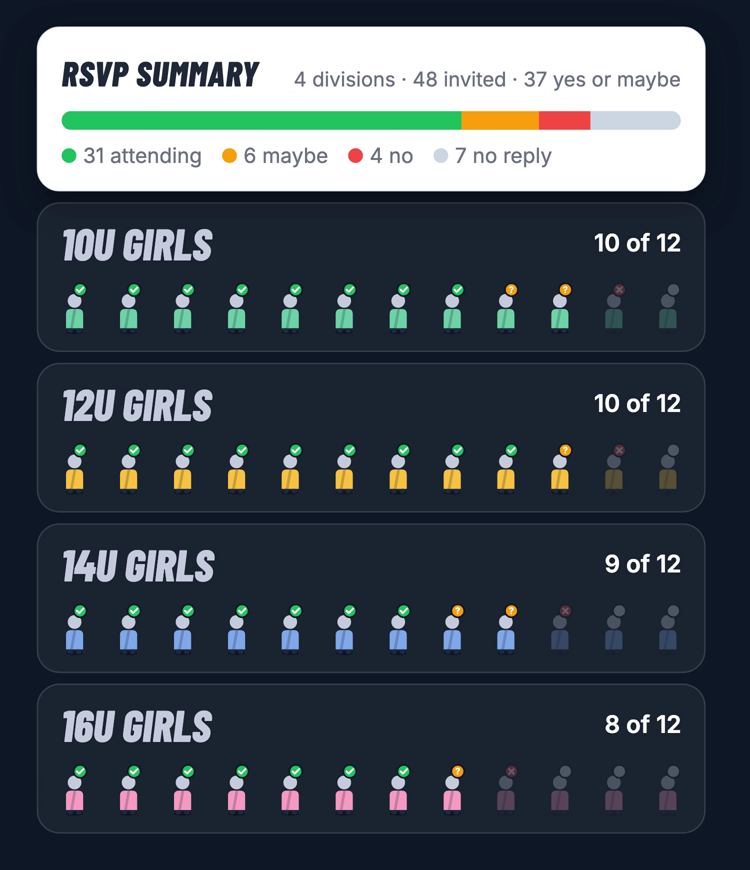
The event’s dashboard puts each division in a row with how many athletes were invited and how they have answered, so the person organizing it sees four divisions at once instead of opening four pages. It is the view that tells you which age group has not replied yet, three days out.
A competition that runs all season
Some tournaments are not one date. The same squad travels three or four times across a season, and each trip is managed as a tournament in Rostered, with its own RSVPs and roster. A series groups those trips into the one competition they belong to, lists them in date order, and shows the record each trip finished with. On the web it adds those records up, so the number you read is the whole competition rather than the last trip.
And it shows up where families already look
Once a trip is visible to families it appears on the club calendar and on the schedule of the team whose division is going, which is where a parent looks first. Nobody has to be told that the February trip exists in a separate place from everything else the season holds.
What’s included
- A multi-division tournament that stands for the whole event
- A tournament per attending division, with its own RSVPs, roster, and games
- Each division published when it is ready, not the moment it is created
- A dashboard showing each division’s invited count and answers
- Travel and lodging notes written once for every attending division
- An event-wide Families huddle, and a separate Staff huddle for your club’s coaches and admins
- Email to a single division’s families, with a count before you send
- A series that groups a season of trips into one competition
- A cumulative record across the trips in a series, on the web
Questions
What is the difference between a tournament and a multi-division tournament?
A tournament is one division going to one event. A multi-division tournament is the event itself, with a tournament inside it for each division attending. A club sending one age group somewhere needs the first; a club sending four needs the second.
Do families RSVP once for the event or once per division?
Per division, because that is where the roster and the games are. The event itself never takes an RSVP at all. A family with children in two divisions answers for each child, and each division’s coach sees their own answers.
We travel to the same competition several times a season. Is that one tournament or several?
Several, grouped. Each trip is managed as a tournament in Rostered, so each one has its own RSVPs and roster, and a series ties them together into the competition they belong to with the trips listed in date order.
What does the record on a series show?
Each trip shows the record it finished with: wins, losses, and ties. On the web the finished trips are added up across the series as well, so you can see how the competition has gone so far. It is your own squad’s record, not a ranking against the other clubs.
Can a family see the series, or only the staff?
Families can open the series and see the trips and how each one finished. The huddle that comes with a series is for the coaches and administrators running it, which is where the planning lives.